The Best Real Estate CRM in 2026: A Buyer's Guide for Agents Who Are Tired of Losing Deals
You woke up because a lead you talked to in March just closed with somebody else. Because you have three tabs open — Zillow, your inbox, a spreadsheet named LEADS_F…
Heads up: some links here are affiliate links. If you buy through them we may earn a commission at no cost to you. It never changes which tools we recommend or what we say about them. Full disclosure.
Contents 52 sections
You woke up because a lead you talked to in March just closed with somebody else. Because you have three tabs open — Zillow, your inbox, a spreadsheet named LEADS_FINAL_v3.xlsx — and you genuinely do not know which one has the most current information. Because you spent $2,400 on ads last quarter and cannot tell anyone, including yourself, what it produced.
That's the actual problem. A CRM is just the thing you've been told will fix it.
This guide is built on that distinction. We're not going to rank ten platforms and call it a day. We're going to diagnose what's actually broken in your business, explain which capabilities fix which problems, and then — and only then — look at specific platforms and who each one genuinely fits. Some of them won't fit you, and we'll say so.
A word on why this matters more than usual right now: in September 2025, LionDesk went dark. Lone Wolf Technologies shut the platform down and roughly 165,000 agents lost access to their drip campaigns, text sequences, and contact databases. Plenty of "best CRM" articles still list it. That should tell you something about the quality of the advice floating around — and it's why vendor stability is a real evaluation criterion in this guide, not an afterthought.
Part 1: What's Actually Broken (Read This Before You Look at Any Software)
Skipping straight to the product comparisons is the single most common way agents end up with expensive software nobody uses. You buy a platform that solves problems you don't have, while your actual bottleneck goes untouched.
So start here. Below are the ten problems that drive nearly every real estate CRM search. Most agents have three or four of them badly. Figure out which ones are yours — that's your buying criteria.
Problem 1: Leads arrive from six places and land in none of them
A modern agent's lead flow is genuinely fragmented. Zillow Premier Agent sends an email. Realtor.com sends a different email. Your IDX site form goes to a Gmail address. Facebook lead ads sit in Meta's Lead Center where nobody checks. Your open house sign-in sheet is on paper in your car. A referral comes in as a text message at 9pm.
Each of those is a separate inbox with a separate notification style and a separate mental checklist. Nobody manages six inboxes well. What actually happens is that two or three become "the ones I check," and the rest quietly rot.
The cost isn't abstract. Portal leads are expensive — Zillow Premier Agent leads averaged around $181 per contact in 2026. Every one that sits unread is money you already spent, thrown away.
What fixes it: unified lead capture — every source piping into one inbox automatically, tagged by origin.
Problem 2: You're losing on speed, and you probably don't know by how much
This is the most quantified problem in the entire industry, and the numbers are brutal.
The MIT/InsideSales Lead Response Management Study found that responding within five minutes makes you 21 times more likely to qualify a lead than responding at the 30-minute mark. That's not a marginal edge. That's the difference between a business and a hobby.
Now the other half. A WAV Group study of 384 US brokers across 11 states measured an average response time of 917 minutes — more than 15 hours — and found that 48% of buyer inquiries received no response at all.
Read that again: nearly half of inquiries got nothing. Not a slow response. Nothing.
Here's why this matters more than any feature list in this guide. Most buyers interview only one agent before deciding — 67% of first-time buyers and 76% of repeat buyers. They aren't running a careful comparison. They're going with whoever showed up first and seemed competent.
You are not competing on skill in that moment. You're competing on latency.
What fixes it: instant automated first-touch (text and email), plus routing that gets the lead to a human fast.
Problem 3: The follow-up you meant to do
You have every intention of calling that buyer back in two weeks. You genuinely do. Then a deal goes sideways, an inspection blows up, a client calls in tears about a financing issue, and two weeks becomes two months.
Real estate follow-up isn't a sprint, it's a multi-year siege. A seller thinking about listing "sometime next year" needs roughly eighteen touches over eighteen months. A buyer who isn't pre-approved yet might need six months of patience. Sales research consistently shows most conversions require five or more follow-up contacts — and most people stop after one or two.
Human memory cannot hold three hundred relationships with individually appropriate timing. It isn't a discipline problem. It's a capacity problem, and it needs a system, not more willpower.
What fixes it: automated sequences with task generation, so the next action always exists somewhere other than your head.
Problem 4: Your database is scattered across systems that don't talk
The client's budget is in an email thread. Their school district preference is in a text. The note about the mother-in-law suite is in your phone's Notes app. Their anniversary is in your head. Their pre-approval letter is in a Google Drive folder you'd have to search for.
Two things break here. First, you waste ten to fifteen minutes reconstructing context before every meaningful conversation. Second, and worse, you eventually get something wrong — you forget the dog, or the commute constraint, or that they already saw and hated that listing — and the client silently downgrades their opinion of you.
The relationship business runs on remembered detail. Scattered data means you're running it on partial memory.
What fixes it: a single contact record where every email, text, call, note, and property view attaches to the person automatically.
Problem 5: You cannot tell which marketing actually works
Ask most agents which lead source produces their best closings and you'll get a confident answer built on a vivid anecdote or two. Ask them to prove it with numbers and the room gets quiet.
Without source-to-close attribution, you're allocating your entire marketing budget on vibes. You're probably overfunding the channel that produces high lead volume and underfunding the one that produces high lead quality — because volume is visible and quality isn't, unless something is tracking it.
This is the single biggest hidden cost of not having a CRM, and it compounds every month you keep spending.
What fixes it: source tagging at capture plus reporting that follows a lead from origin through closing.
Problem 6: Your team has no shared source of truth
Two agents call the same lead. Nobody knows who owns the relationship. A lead sits unclaimed over a weekend because it went to someone who was out of town. An agent leaves the team and takes their client relationships — and their entire database — with them, because it was never really in a shared system.
For team leads, add a layer: you're accountable for production but you have zero visibility into activity. You can see closings, which are a lagging indicator by 60 to 90 days. You can't see calls made, follow-ups skipped, or leads sitting untouched — the leading indicators that would actually let you coach someone before the quarter is lost.
What fixes it: shared database with ownership rules, routing logic, and activity-level reporting.
Problem 7: Administrative work has eaten your selling time
Data entry. Appointment confirmations. Sending the same "here's what to expect at closing" email for the four-hundredth time. Manually updating a transaction checklist. Chasing a lender for a status update.
None of this generates revenue. All of it is necessary. Most of it is identical every single time — which is precisely what makes it automatable.
The math is simple and uncomfortable: if admin consumes 12 hours a week and half of that is genuinely repeatable, you're losing six hours a week of selling time. Call it 300 hours a year. At any reasonable value on your time, that's a meaningful fraction of a commission.
What fixes it: templated workflows, transaction checklists, and automated confirmations.
Problem 8: You're rebuying clients you already own
Here's the most expensive gap in the industry, and it's almost entirely invisible.
NAR's 2025 Profile found that 88% of buyers purchased through an agent or broker, and more than nine in ten buyers say they'd use their agent again, with 87% of sellers saying they'd recommend theirs. Satisfaction is not the problem.
But look at where business actually comes from: 43% of buyers used an agent found through a referral, and 18% used an agent they'd worked with before. On the seller side, 66% either came through a referral or returned to a past agent.
So past clients and their networks represent the majority of available business — and the intent to return is already there. The gap is contact. NAR's most recent member data puts repeat business at a median of 28% and past-client referrals at 22%, which means most agents are capturing only a fraction of a pool that has already said yes.
You are spending $181 a lead to acquire strangers while a database of people who like you goes quiet.
What fixes it: long-horizon nurture — anniversary triggers, market updates, equity check-ins — running automatically for years without you thinking about it.
Problem 9: You can't scale, because the system is you
Every process lives in your head. Every lead gets your personal judgment. Every follow-up depends on your memory.
That works at 12 transactions a year. At 30 it strains. At 50 it breaks — and hiring doesn't fix it, because there's nothing to hand a new person. You can't delegate intuition. New agents flounder for months because "how we do things here" was never written down anywhere they can see.
What fixes it: documented, encoded processes — action plans a new hire inherits on day one.
Problem 10: Every client gets a different experience
Some clients get a beautiful onboarding packet. Some get nothing because you were slammed that week. Some get weekly updates. Some get radio silence for a month.
Inconsistency doesn't just create bad experiences. It makes your business unmeasurable. If the process changes every time, you can't tell whether a bad outcome came from a bad lead, a bad market, or a step you skipped. You can't improve what isn't repeatable.
What fixes it: standardized pipelines where every deal moves through the same stages with the same triggered actions.
Part 2: The Fears Nobody Says Out Loud
Every agent I've ever talked to about CRM software has a version of the same list running in the background. It's worth naming, because these fears are legitimate and they should shape how you buy.

"I'll pick wrong and be stuck." Reasonable. Migrating a database twice is genuinely painful, and some vendors make leaving expensive on purpose. Mitigate it by checking contract length, export capability, and month-to-month availability before you sign — not after.
"I'll pay for it and nobody will use it." This is the most rational fear on the list, because it's the most common outcome. Industry adoption failure rates for CRM sit somewhere between 30% and 70% depending on whose study you read. This is why "easiest to learn" is a serious criterion and not a soft one.
"The price on the website isn't the real price." Correct, frequently. Dialers, texting, AI modules, extra MLS feeds, setup fees, ad management percentages — the sticker is often 50–70% of the true cost. Part 8 covers this in detail.
"I'm already behind." Maybe. But the agents winning right now mostly aren't winning on sophistication — they're winning on responding first and following up consistently. Those are solved problems. You can close that gap in a quarter.
"There are forty options and they all claim the same things." Also correct. Which is why Part 5 reduces the market to one binary decision that eliminates most of the field immediately.
Hold onto these. Good buying decisions come from matching software to your actual constraints, not from being impressed during a demo.
Part 3: What You're Actually Hiring a CRM to Do
Reframe the purchase. You're not buying a database. You're hiring a system to perform ten specific jobs. Grade any platform on these, not on feature-count.

| # | The job | What success looks like | What it's worth |
|---|---|---|---|
| 1 | Capture every lead | Zero leads lost between source and system | Recovers 10–20% of paid lead spend |
| 2 | Respond before competitors | First touch under 5 minutes, 24/7 | The 21x qualification multiplier |
| 3 | Never drop a follow-up | Every contact has a scheduled next action | Most conversions need 5+ touches |
| 4 | Remember everything | One record per person, complete history | Trust, and no embarrassing misses |
| 5 | Prove marketing ROI | Source-to-close attribution | Reallocates budget to what works |
| 6 | Make the team visible | Leading indicators, not just closings | Coaching before the quarter is lost |
| 7 | Automate the repeatable | Admin drops materially | ~300 hours a year back |
| 8 | Scale beyond you | Processes exist outside your head | Hiring stops being a gamble |
| 9 | Convert more of the same traffic | Higher lead-to-appointment rate | More revenue, zero extra ad spend |
| 10 | Harvest the database you own | Systematic past-client contact | The cheapest business in real estate |
If a platform is exceptional at seven of these and irrelevant on three, that's fine — as long as the three you don't need are the three it's bad at. That's the whole evaluation, in one sentence.
Part 4: Features, and Why Each One Actually Matters
Feature lists are useless in isolation. Here's each capability tied to the outcome it produces — and, importantly, when you can safely ignore it.
Lead capture and lead routing
Lead capture pulls inquiries from every source into one system automatically. Routing decides who gets each one and how fast.
Why it matters: this is the direct fix for Problems 1 and 2 — the two most expensive problems on the list. Routing logic matters more than most buyers realize. Round-robin distributes evenly. First-to-claim rewards hustle but can leave leads orphaned. Rules-based routing sends luxury inquiries to your luxury specialist and Spanish-language leads to your Spanish-speaking agent. The best implementations include a catch-all rule so nothing can fall through when nobody claims it.

Solo agents: routing barely matters, capture matters enormously. Teams: routing is the product.
Lead scoring and AI lead scoring
Scoring ranks contacts by likelihood to transact. Basic versions use rules — a lead who viewed nine listings this week outranks one who viewed one in March. AI versions weight behavioral signals across your whole database.
Why it matters: you have finite hours and hundreds of contacts. Scoring is the difference between working your list top-down by intent versus alphabetically by whoever you remember. It converts "I should call people today" into "call these seven people today."
The honest caveat: scoring quality depends entirely on data quality. If your CRM can't see property-viewing behavior — which usually means you don't have IDX feeding it — scoring is guessing with extra steps.
Pipeline management
Visual stages: New → Contacted → Qualified → Appointment Set → Showing → Offer → Under Contract → Closed.
Why it matters: it converts an anxious feeling ("I think things are okay?") into a diagnosis. When 40 leads pile up in Contacted and three reach Appointment Set, you don't have a lead problem — you have a qualification problem, and no amount of extra ad spend will fix it. The pipeline is where you find out which part of your business is actually broken.
Email and SMS automation
Sequences that fire on triggers rather than memory.
Why it matters: this is Problem 3, solved structurally. The eighteen-month seller nurture runs whether or not you're having a good month.
SMS deserves specific attention: 89% of consumers prefer text over calls, and text is what actually wins the five-minute window — an instant, well-written text buys you time to prepare a proper call. Just confirm how each vendor handles A2P 10DLC registration and per-message costs, because that's a common surprise line item.
AI: follow-up, email drafting, and call summaries
Three separate things sold under one word. Worth separating.
AI follow-up agents engage leads conversationally over text or chat, qualify them, and hand off to a human. This is the one with real economics behind it — roughly 62% of inquiries arrive outside business hours, and an AI agent covers the overnight gap you cannot staff. Set expectations carefully: it should hand off to a human early, and its tone needs configuration or it will sound like a robot in a way that costs you credibility.
AI email drafting writes first drafts you edit. Modest but real: cuts a 10-minute market-update email to 3 minutes, across dozens of emails a week.
AI call summaries transcribe calls and extract action items automatically. Underrated. It's the difference between "we talked, it went well" and a permanent record of the four specific things the client said they needed.
A blunt assessment: AI is currently the most oversold category in real estate software. Every vendor claims it. The useful question at a demo is never "do you have AI" — it's "show me exactly what it does when a Zillow lead comes in at 11:40pm on a Saturday."
Workflow automation
If/then logic beyond email. When a deal moves to Under Contract, create eleven tasks, notify the transaction coordinator, email the client the closing timeline, and schedule the 30-day check-in.
Why it matters: this is what turns a contact database into an operations system, and it's the direct answer to Problems 7, 9, and 10 simultaneously. It's also the feature with the widest quality gap between platforms — and the one most likely to be quietly skipped in a sales demo. Ask to see the builder itself.
IDX and MLS integration
IDX puts live listings on your own site. MLS integration pulls property data into the CRM directly.
Why it matters — and this is the part agents underestimate: IDX isn't really about the website. It's about behavioral intelligence. When a buyer searches on your site rather than Zillow, you learn which listings they viewed, which they saved, which they returned to at midnight three nights running. That data is what makes lead scoring work and what makes your follow-up specific instead of generic. When they search on a portal, the portal keeps that intelligence and sells it back to you.
However: an IDX site is only an asset if you can drive traffic to it. If you have no SEO and no ad budget, a bundled IDX website is a beautiful storefront on an empty street — and you're paying for it monthly. Be honest about this before you buy an all-in-one platform primarily for its website.
MLS integration depth varies more than you'd expect. Top Producer, for example, connects to the MLS directly rather than through a limited IDX feed, giving access to substantially richer listing data than the typical feed provides. Also confirm per-feed costs if you work multiple markets — additional MLS feeds are routinely billed as separate line items.
Mobile apps
Why it matters: real estate is not a desk job. If logging a call requires getting to a laptop, calls won't get logged, and an incomplete CRM is worse than no CRM because you'll trust it and be wrong.
Test the app during your trial, not the desktop version. Log a call, add a note, and check a task from a parking lot. That's the actual use case.
Analytics and reporting
Why it matters: this closes the loop on Problem 5. The reports that matter are boring and specific: cost per lead by source, lead-to-appointment rate by source, appointment-to-contract rate, average days from first contact to close, and activity volume per agent.
Notice that four of those five are ratios, not totals. Totals tell you how busy you were. Ratios tell you where the machine is leaking.
Marketing automation
Newsletters, listing announcements, market reports, drip campaigns, landing pages.
Why it matters: it's how Problem 8 gets solved at scale. Staying in front of 400 past clients monthly is impossible manually and trivial automatically. This is the highest-ROI, lowest-glamour feature in the entire category.
Task management and calendar integration
Why it matters: a CRM that doesn't generate tasks is a filing cabinet. Automatic task creation on stage changes is what converts intent into action. And two-way calendar sync matters more than it sounds — if your CRM calendar and your actual calendar diverge, you'll stop trusting the CRM within a week, and once trust is gone the tool is dead.
Team collaboration
Shared records, @mentions, assignment, permissions, activity feeds.
Why it matters: solves Problem 6, and quietly solves a business-asset problem too. When relationships live in a shared system, the database belongs to the business rather than walking out the door with a departing agent.
Third-party integrations
Why it matters: this is your insurance policy against the vendor's product roadmap. A CRM with a genuine open API and a large integration library means you can add best-in-class tools rather than accepting whatever the vendor ships. Follow Up Boss's roughly 250 integrations are the main reason it functions as a hub rather than a silo.
Check specifically for: your lead sources, your dialer, your transaction management system, Zapier or equivalent, and whether the API is available on your tier — some vendors gate API access to enterprise plans only.
Customer support and onboarding
Why it matters: this is the feature that determines whether you get any of the others. The most common CRM failure isn't a bad product — it's a good product configured badly in week one, then abandoned in week three.
Wise Agent's 24/7/365 live human support, with a 4.6/5 support score on Capterra, is a genuine differentiator and a legitimate reason to choose a less feature-rich platform if you're not technical. That trade is often correct.
Part 5: The One Decision That Eliminates Most of the Market
Before comparing a single platform, answer one question:
Do you need software to generate leads, or only to manage the leads you already generate?
This splits the market cleanly in two, and getting it right eliminates about 70% of your options in thirty seconds.
CRM-first platforms — Follow Up Boss, Wise Agent, Lone Wolf Relationships, Pipedrive, HubSpot — assume you already have lead sources and a website. They organize, route, and follow up. They're generally cheaper, more flexible, easier to leave, and they integrate widely because integration is the strategy.
All-in-one platforms — Lofty, BoldTrail, Real Geeks, CINC, Sierra Interactive — bundle an IDX website and lead generation with the CRM. Capture, nurture, and follow-up live in one system. They cost more, lock in harder, and customize less — but nothing falls between tools, because there are no gaps between tools.
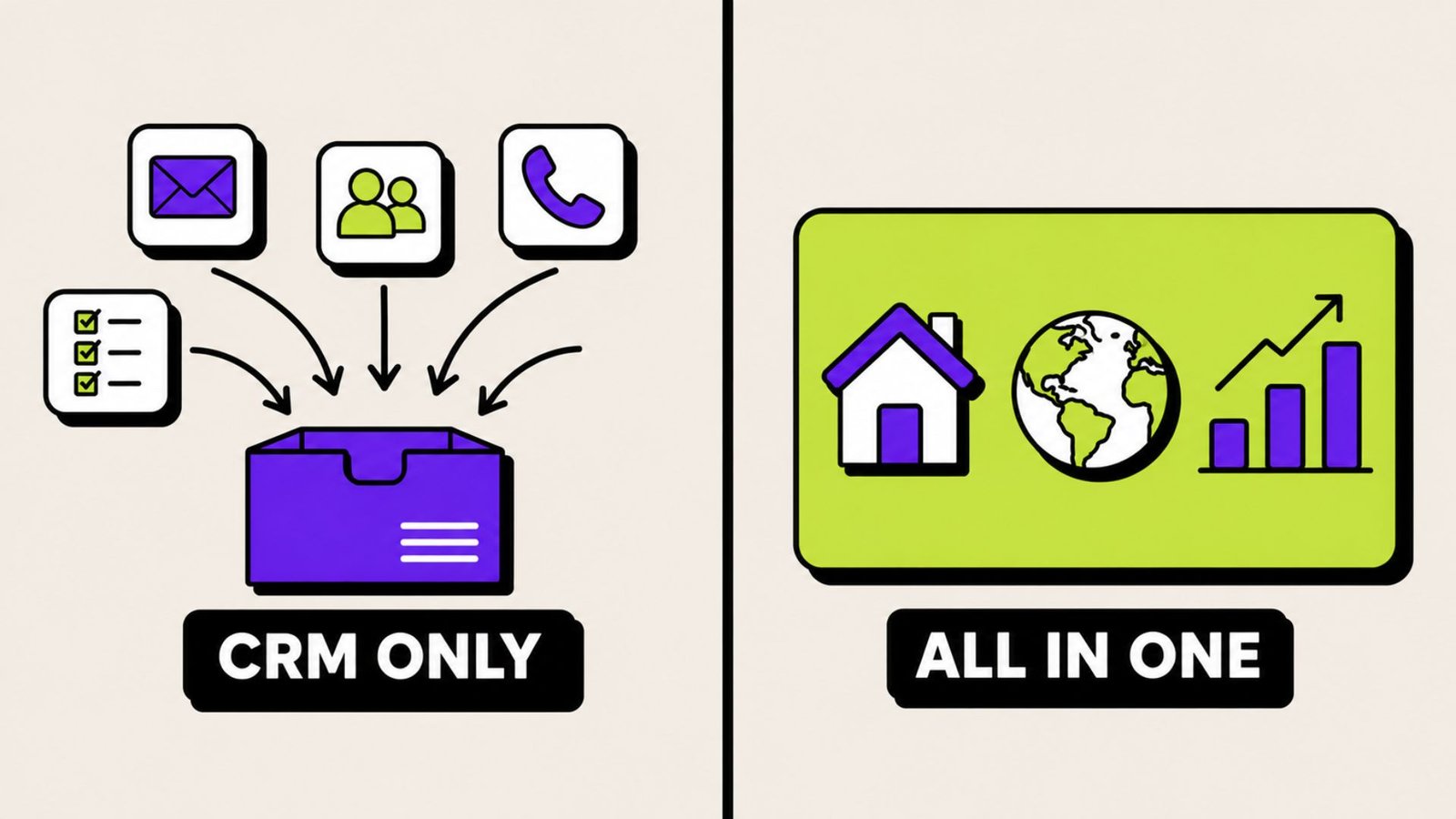
The distinction genuinely determines fit: CRM-first tools are built to organize, route and follow up on leads you bring from elsewhere, while all-in-one platforms bundle IDX and lead generation so capture and follow-up live in one system.
How to decide:
Choose CRM-first if you already have a website you like, your leads come from a portal or referrals or your sphere, you want to keep your existing tools, or you want predictable per-seat pricing.
Choose all-in-one if you have no real website presence, you want to build organic and paid lead flow, you're a team that needs one system to run everything, or you're tired of tools that don't talk to each other.
The expensive mistake: buying an all-in-one platform for the bundled website, then continuing to buy leads from portals anyway and routing them into a second CRM. Now you're paying twice for lead management and using neither well. If you go all-in-one, commit to the website. If you won't, don't pay for it.
Part 6: The Platforms — Honest Assessments
A note on pricing: every figure below was verified against public sources in July 2026. Several vendors don't publish pricing at all, in which case these are third-party and user-reported ranges. Real estate software pricing changes frequently and is often negotiable. Treat these as planning numbers and get a written itemized quote before you sign anything.

Follow Up Boss — the default choice for teams
Follow Up Boss starts at $69 per user per month for solo agents, with team plans at $499/month for up to 10 users and a Platform tier at $1,000/month for up to 30. It was acquired by Zillow in late 2023 and continues to operate as a standalone product. Annual billing drops the entry tier to about $58 per user per month, and there's a 14-day trial with no upfront commitment.
The catch to budget for: calling and texting are a paid add-on on the entry tier — $39/user/month monthly or $33 annually — which brings a solo agent's realistic cost closer to $108/month. Pro and Platform include unlimited calling and texting.
What it's genuinely good at: lead routing, speed-to-lead workflows, team accountability reporting, and integration breadth. It behaves less like an app and more like an operating system that other tools plug into. Transparent pricing and no contracts are real advantages in a category full of neither.
Who it's wrong for: solo agents on a tight budget (you're paying for team infrastructure you won't use), and anyone who needs a website — it doesn't include one, by design.
The Zillow question, since people ask: the acquisition raises reasonable questions about a lead-portal owner controlling your lead database. The counterargument is that the open API remains in place and integration breadth hasn't narrowed. Worth factoring into your risk assessment; not, on current evidence, disqualifying.
Lofty (formerly Chime) — the strongest AI story
Lofty runs $449 to $1,500/month plus a $299 setup fee as of 2026, with the range mapping to package tier and team size. Reported setup fees range from $299 to $1,499 depending on configuration, and pricing is request-based rather than published. It rebranded from Chime, so any Chime-era pricing you find is historical.
What it's good at: named AI agents, built-in lead generation, and the strongest native AI capability of the major platforms. Worth distinguishing its two AI products: the AI Assistant handles drafting, call summaries, and task management, while the AI Sales Agent engages leads across chat, SMS and email to qualify and book appointments — the latter starting around $60/month for 200 leads. If your core problem is that leads arrive faster than humans can answer, especially after hours, this is the category leader.
Who it's wrong for: solo agents (economics don't work), anyone who needs published pricing before a sales call, and buyers who want to avoid setup fees and annual commitments.
BoldTrail (formerly kvCORE) — brokerage infrastructure
BoldTrail is the rebranded kvCORE from Inside Real Estate; the 2024 rebrand unified kvCORE, BackOffice and Buyside into one ecosystem. Third-party reports put individual-agent pricing around $499/month. Teams typically land between $500 and $1,500/month, and brokerages with 50+ agents often negotiate below $25 per agent.
What it's good at: scale. The per-agent economics get genuinely attractive at brokerage size, and the breadth — IDX, marketing automation, recruiting, back office — is hard to match with assembled tools.
What to watch: annual contracts are the default, mid-contract migration forfeits remaining contract value, and API access requires the Platform or Enterprise tier. Reviewers commonly report sluggish performance and slow load times, and new agents typically need two to four weeks to get comfortable.
Who it's wrong for: solo agents, almost universally — the pricing model is built for volume, and solo agents typically find $500+/month prohibitive.
Sierra Interactive — the transparent all-in-one
Three tiers — Starter, Essential, Growth — at $299.95, $399.95, and $599.95/month on annual billing. Monthly billing adds a flat $500 setup fee and raises rates roughly 17–20%. Lead Engage, the AI texting assistant, isn't available on Starter and costs $199/month on the higher tiers. The dialer is a $100/month add-on on Starter and Essential, bundled into Growth.
What it's good at: SEO-first website architecture and organic lead generation. Its search experience supports natural-language queries like "homes near good schools," matching what buyers expect from the portals, and its routing supports auto-assign, first-to-claim, and round-robin with a catch-all rule so nothing goes unclaimed. It also publishes its prices, which in this category is a meaningful signal.
Who it's wrong for: The Close's review specifically flags it as not the best fit for solo agents. Also wrong if you won't invest in SEO or PPC — the website advantage is the product, and it needs traffic to mean anything.
Real Geeks — the value all-in-one
Real Geeks typically starts around $299/month for the platform plus $300–$1,000+/month in ad spend, with most agents budgeting $600–$1,500/month all-in. It commonly requires a 6–12 month commitment. Higher tiers run to the $1,299–$1,599 range before add-ons.
What it's good at: the cheapest credible entry into a bundled IDX site plus CRM. Good fit for a solo agent or small team who wants an all-in-one without four-figure monthly commitments.
What to watch: as a value platform, automation depth, reporting and customization don't match higher-priced systems. And the advertised price is genuinely only part of the picture — the model assumes you're running ads.
CINC — paid lead volume at scale
CINC starts at $899–$1,299/month for solo agents, with core tools like the dialer charged as add-ons from $75/month per user. Platform fees typically run $900–$1,500/month combined with mandatory ad spend, bringing all-in costs to $1,800–$3,500+.
What it's good at: exactly one business model, done extremely well — buy a high volume of paid leads and route them to agents who work them fast. If your model is "buy a lot of leads and distribute them," it's purpose-built for that.
Who it's wrong for: almost everyone else. The lead model leans paid rather than organic — you're renting traffic rather than building it. If your business runs on sphere and referrals, this is the wrong instrument entirely.
Wise Agent — the best value for solo agents
$49/month flat for up to five team members on a shared login, or $499/year. Texting adds $11/month plus an $80 one-time registration fee; individual logins are $20/month each. A five-agent team with individual logins and texting lands around $160/month total.
What it's good at: the support is the headline — 24/7 live humans, 365 days a year, 4.6/5 across 531 reviews. It also includes transaction management with unlimited document storage, and Forbes Advisor named it Best Real Estate CRM in 2022, 2023 and 2024. The flat pricing is a structural advantage: five people for $49 total versus $69 per person elsewhere is not a small difference.
Who it's wrong for: larger teams needing sophisticated routing and reporting, and anyone whose core problem is lead generation — it manages leads, it doesn't produce them.
Lone Wolf Relationships — the LionDesk successor
Worth covering because so many agents were forced into this decision. Lone Wolf discontinued LionDesk by September 2025 and migrated users to Relationships at comparable pricing starting around $30/month.
Assess it honestly: it isn't a clear upgrade. Texting is the biggest friction point — LionDesk had SMS built into agent workflows, while Relationships handles it through an EZ Texting add-on, and agents have reported uncertainty about porting existing phone numbers.
The reasonable conclusion: if you're already being forced to learn a new system and rebuild your texting workflow, the "official successor" has no real switching-cost advantage. Evaluate the whole market instead of defaulting.
And the broader lesson, which applies to every platform on this page: vendor stability is a feature. Lone Wolf acquired LionDesk in 2021, stripped out the dialer and bulk texting over the following years, then shut it down entirely. Ask about company ownership, funding, and product roadmap before you commit a database to anyone.
General-purpose CRMs — HubSpot, Pipedrive, Zoho
Zoho starts around $14/user/month, HubSpot has a free tier with paid plans from $20/user/month, and Pipedrive starts around $14/user/month. Pipedrive is frequently singled out for its drag-and-drop email builder, and Zoho for having over 1,000 third-party integrations.
The honest trade: you get more power per dollar and far better customization, but nothing is real-estate-native. No IDX. No MLS. No transaction checklists. No pre-built buyer or seller sequences. You're building your industry logic yourself.
Who this actually fits: commercial brokers (whose workflows are poorly served by residential-focused tools anyway), investor-agents with unusual pipelines, and technically comfortable agents who'd rather configure than pay a real-estate premium. For most residential agents, the time cost of building it yourself exceeds the savings.
Part 7: Which One Is Right for You
Comparison at a glance
| Platform | Entry price (July 2026) | Type | Best for | Weakest for |
|---|---|---|---|---|
| Wise Agent | $49/mo flat, up to 5 users | CRM-first | Solo agents, budget, support | Large teams, lead gen |
| Follow Up Boss | $69/user/mo ($58 annual) | CRM-first | Teams 2–30, speed-to-lead | Solo budget buyers, no website |
| Real Geeks | ~$299/mo + ad spend | All-in-one | Value IDX + CRM bundle | Deep automation, reporting |
| Sierra Interactive | $299.95–$599.95/mo | All-in-one | SEO-led teams | Solo agents |
| Lofty | ~$449/mo + $299 setup | All-in-one | AI follow-up, after-hours | Solo agents, price transparency |
| BoldTrail | ~$499/mo, negotiable at scale | All-in-one | Brokerages, 50+ agents | Solos, contract flexibility |
| CINC | $899–$1,299/mo + ad spend | All-in-one | High-volume paid leads | Sphere-driven businesses |
| Top Producer | ~$98–$179/user/mo | CRM-first | Deep MLS data needs | Budget buyers |
| HubSpot / Pipedrive | Free–$20/user/mo | General | Commercial, custom pipelines | Residential-native workflows |
By business type
New agent, first two years, under $100/month. Wise Agent. Your problem is organization and consistency, not lead volume — and 24/7 human support matters far more than AI when you're learning. Free alternative: HubSpot's free tier, accepting that you'll build real estate structure yourself.
Established solo agent, 15–30 transactions. Wise Agent if your business runs on sphere and referrals. Follow Up Boss if you buy portal leads and speed is your bottleneck. Real Geeks if you have no website and want to start building organic flow. Your deciding question is where next year's growth comes from.
Small team, 2–10 agents. Follow Up Boss is the default for a reason — routing, accountability reporting, and integration breadth are exactly the team problems. Wise Agent if budget is tight and your routing needs are simple. Sierra Interactive if you're building an SEO-led lead engine rather than buying leads.
Large team, 10–30 agents. Follow Up Boss Pro or Platform if you generate leads elsewhere. Lofty if after-hours response is your measurable gap. CINC if you're running a paid-lead machine at volume. At this size, reporting depth and routing sophistication outweigh price differences — an underperforming agent costs more per month than any of these platforms.
Brokerage, 30+ agents. BoldTrail or Lofty enterprise. Per-agent economics improve sharply at scale, and you need recruiting and back-office modules that smaller platforms don't offer. Negotiate hard, get everything itemized in writing, and pay close attention to contract exit terms.
Luxury or referral-driven agent. Wise Agent or Follow Up Boss, with your effort going into long-horizon nurture rather than lead capture. Your business is Problem 8, not Problem 1 — the ROI is in past-client automation, and expensive lead-gen platforms are wasted spend.
Commercial broker or investor-agent. Pipedrive, HubSpot, or Zoho. Residential-native tools model a transaction type you don't run.
Part 8: What It Actually Costs
The subscription is rarely the full number. Budget for all of these:
| Cost | Typical range | Notes |
|---|---|---|
| Base subscription | $49–$1,500/mo | The advertised figure |
| Setup / onboarding | $0–$1,499 one-time | Lofty ~$299; Sierra $500 on monthly billing |
| Dialer / calling | $33–$100/user/mo | Add-on on FUB Grow; CINC from $75/user |
| SMS / texting | $11–$199/mo + fees | Wise Agent $11 + $80 registration; A2P fees extra |
| AI modules | $60–$199/mo | Lofty AI Sales Agent from ~$60/200 leads |
| Extra MLS feeds | ~$50/mo each | Matters if you work multiple markets |
| Extra users | $17–$49/user/mo | FUB additional users $41–$49 |
| Ad management | 10% of spend + minimums | Sierra: 10% of Google spend, $500/mo minimum |
| Ad spend itself | $300–$3,000/mo | Required by lead-gen platforms |
| Your time | 10–40 hours | Setup, migration, training |
Three questions that save people the most money:
- What is my total first-year cost, itemized? Not monthly. First year, everything included. The number is often 60–100% above the sticker.
- What's the contract term, and what happens if I leave in month four? Some vendors forfeit remaining contract value on mid-contract migration.
- Can I export my full database, including notes and history, on demand? If the answer is vague, that's your answer.
How to think about ROI. At a $9,000 average commission, a $500/month platform costs $6,000 a year — roughly two-thirds of one deal. The question isn't "is this expensive." It's "will this produce one additional closing per year?" For most agents doing meaningful volume, converting even one extra lead from an existing pipeline clears the bar. For an agent doing four transactions a year, a $500/month platform is very hard to justify — and that's exactly the case for starting at $49.
Part 9: Why CRMs Fail (And How to Not Be That Statistic)
Most CRM failures are implementation failures, not product failures. Same software, same price, wildly different outcomes. Here's what separates them.
Failure 1: importing a dirty database. You dump 3,000 contacts including duplicates, dead emails, and people you met once in 2018. The system feels like noise from day one and you stop trusting it. Fix: import your real relationships first. Two hundred good contacts beats three thousand bad ones. Everything else can come later, or not at all.
Failure 2: no defined process to automate. Automation encodes a process. If you don't have one, you're automating chaos faster. Fix: write down your actual buyer follow-up sequence on paper first. Then build it.

Failure 3: building everything before using anything. Six weeks configuring, zero weeks selling, motivation gone. Fix: go live in week one with contacts, one pipeline, and one automated sequence. Add complexity only when a specific problem demands it.
Failure 4: the team never bought in. Leadership picks it, announces it, and agents keep their spreadsheets. Fix: involve two agents in the trial and let them help decide. Then make it non-optional at the source — leads route only through the CRM, so it becomes the path of least resistance rather than extra work.
Failure 5: no owner. Everyone's responsibility is nobody's responsibility. Fix: one named person owns configuration, data hygiene, and questions. Even if that person is you.
Failure 6: it never became a habit. Fix: anchor it to something that already happens daily. Open the CRM before email. Log every call before the next one starts. Thirty days of that and it stops requiring willpower.
Part 10: How to Run a Trial and a Demo Properly
You're going to trial two or three platforms. Do it deliberately.
Before the demo
Write down your top three problems from Part 1 and your must-have integrations. Bring both. This single step converts a demo from a sales presentation into an evaluation.
Questions that get real answers
Vendors have polished responses to generic questions. These ones are harder to deflect:
- "Show me exactly what happens, step by step, when a Zillow lead comes in at 11:40pm Saturday."
- "Show me the workflow builder itself — not a pre-built example."
- "What's the total first-year cost for my exact configuration, itemized in writing?"
- "What contract am I signing, and what's the cost of leaving in month four?"
- "Can I export everything — contacts, notes, history — myself, without asking support?"
- "What's your average support response time, and what hours is a human available?"
- "What's the single most common reason customers leave?"
That last one is the best question on the list. An honest answer tells you more than the rest of the demo. A non-answer tells you something too.
Using the trial well
Two weeks isn't long. Spend it on the things that actually predict success:
- Import 50 real contacts, not a test file.
- Build one automated sequence end to end.
- Work three real leads entirely inside the system.
- Use the mobile app in the field — log a call from your car.
- Contact support with a real question and time the response.
- Export your data and confirm the file is actually usable.
Step six is the one everyone skips and the one that matters most three years from now.
The comparison scorecard
Score each platform 1–5, weighted by what your business actually needs:
| Criterion | Weight | Why |
|---|---|---|
| Solves my top 3 problems | ×3 | Everything else is secondary |
| Daily ease of use | ×3 | Determines adoption, which determines everything |
| Integrates with my stack | ×2 | Broken integration = manual work forever |
| Total first-year cost | ×2 | Real number, not sticker |
| Support quality | ×2 | Determines whether you get value from any feature |
| Automation depth | ×2 | Where the compounding returns live |
| Reporting | ×1–3 | ×1 solo, ×3 for teams |
| Contract flexibility | ×1 | Matters most if you're uncertain |
The winner is usually not the platform with the highest raw feature score. It's the one that scores well on the first two rows.
Part 11: Your First 90 Days
Days 1–7: live, minimally. Import your real contacts (clean, not complete). Connect email and calendar. Build one pipeline. Connect your primary lead source. Log every call for one week. That's it — resist configuring anything else.
Days 8–30: automate the highest-value sequence. Build one new-lead sequence: instant text, follow-up email, day-three task, week-two check-in. Connect remaining lead sources. Verify source tagging is working, because everything in Part 5's reporting depends on it. Set up your daily view — the one screen you open every morning.
Days 31–60: expand deliberately. Add a past-client nurture campaign (this is your highest-ROI automation, see Problem 8). Build transaction checklists. Add a seller sequence. If you're a team, configure routing rules and run a test lead through them. Review your first month of data and find one obvious leak.
Days 61–90: measure and coach. You now have enough data for real ratios: cost per lead by source, lead-to-appointment rate, average response time. Reallocate budget based on what you can now see. If you have a team, start running weekly activity reviews. Cut any automation nobody's using — an unused workflow is clutter that makes the system feel heavier than it is.
At 90 days, ask one question: is my average first-response time under five minutes, and does every active contact have a scheduled next action? If yes, the system is working regardless of what else you haven't set up. If no, nothing else you configure will matter.
Part 12: Frequently Asked Questions
What is the best real estate CRM in 2026? There isn't a universal answer, and any article that gives you one is selling something. It depends on whether you need lead generation or only lead management. For teams managing leads from elsewhere, Follow Up Boss is the strongest default. For AI-driven follow-up, Lofty leads. For brokerages at scale, BoldTrail. For SEO-led teams, Sierra Interactive. For solo agents and value, Wise Agent. For high-volume paid leads, CINC.
How much does a real estate CRM cost? Roughly $49/month at the low end to $1,500+/month for all-in-one platforms, before add-ons. Most solo agents land between $49 and $110/month once texting is included; teams typically run $300–$1,000/month; brokerages negotiate per-agent rates. Always budget 40–60% above the advertised price for dialers, texting, AI modules, and setup.
Which real estate CRM is best for solo agents? Wise Agent, for most. $49/month flat with 24/7 live support covers the actual solo problems — organization, consistent follow-up, and having a human to call when you're stuck. Choose Follow Up Boss instead if you buy portal leads and speed-to-lead is your specific bottleneck.
Which real estate CRM is best for teams? Follow Up Boss for most teams under 30 agents, primarily for routing depth, accountability reporting, and 250+ integrations. Larger operations should look at BoldTrail or Lofty enterprise tiers.
Which real estate CRM has the best AI? Lofty, currently. Its named AI agents give it the strongest native AI capability among the major platforms. But interrogate the claim — ask any vendor to demonstrate exactly what their AI does with an after-hours lead, rather than accepting "AI-powered" as a feature.
Which real estate CRM integrates with Zillow? Most major platforms do. Follow Up Boss integrates natively and is owned by Zillow. BoldTrail, Lofty, Sierra Interactive, Real Geeks, and CINC all support portal lead ingestion. Confirm whether it's a true native integration or a Zapier workaround, since the latter adds latency — and latency is the whole game.
Which CRMs support MLS and IDX? All-in-one platforms — Lofty, BoldTrail, Real Geeks, CINC, Sierra Interactive — include IDX websites with MLS feeds. CRM-first platforms like Follow Up Boss and Wise Agent don't host listings directly but integrate with IDX providers, capturing lead activity from your site into the CRM. Top Producer connects to the MLS directly rather than through a limited feed, providing substantially richer property data. Confirm your specific MLS is supported and ask about per-feed costs for additional markets.
Which real estate CRM is easiest to learn? Wise Agent and Pipedrive, generally. By contrast, kvCORE/BoldTrail typically takes new agents two to four weeks to get comfortable. Weight this heavily — the most powerful platform your team refuses to open is worth less than the simple one they use daily.
Which has the best customer support? Wise Agent, by a clear margin: 24/7/365 live humans and a 4.6/5 support score across 531 reviews. Follow Up Boss also rates well. Support quality varies widely at the enterprise end — BoldTrail reviewers report occasional support delays.
Do I need a CRM if I only do a few deals a year? Not an expensive one. At under eight transactions, a $500/month platform can't pay for itself. Start at $49/month, or even a free tier, and focus on the two habits that produce returns regardless of software: respond fast, and follow up consistently.
Can I switch CRMs later? Yes, but it costs real time and some data fidelity. Notes, custom fields, and automation histories often don't transfer cleanly. Reduce future pain by confirming export capability before you buy — and by avoiding long contracts while you're still uncertain.
Is an all-in-one platform better than a CRM plus separate tools? Neither is better in the abstract. All-in-one wins on integration and single-vendor simplicity; assembled stacks win on flexibility, cost, and best-in-class components. The deciding factor is whether you'll actually use the bundled website. If you won't drive traffic to it, you're paying monthly for an asset you don't own the demand for.
What happened to LionDesk? Lone Wolf shut it down at the end of September 2025. Existing users were migrated to Lone Wolf Relationships at comparable pricing starting around $30/month, and new signups are no longer possible. If you're evaluating a replacement, treat it as an opportunity to assess the full market rather than defaulting to the official successor.
The Bottom Line
The best real estate CRM is not the one with the longest feature list, the most impressive AI demo, or the highest position on somebody's affiliate ranking.
It's the one that helps you capture every lead, respond faster than your competition, follow up without relying on memory, keep past clients close, and see clearly where your business is leaking revenue — and that you and your team will actually open every single morning.
That last clause carries most of the weight. A $49/month platform used daily will out-earn a $1,500/month platform used weekly, every time, without exception.
So work backwards from the problem, not forwards from the product. Identify your two or three real bottlenecks from Part 1. Decide whether you need lead generation or lead management. Trial two platforms properly. Buy the one that fixes what's actually broken, then implement it deliberately over ninety days.
Do that, and the software stops being an expense on your P&L and starts being the system your business runs on.