



If your website has multiple pages with similar or identical content, search engines can get confused about which one to rank. This confusion can dilute your rankings and split your traffic across different URLs.
That’s where canonical tags come in.
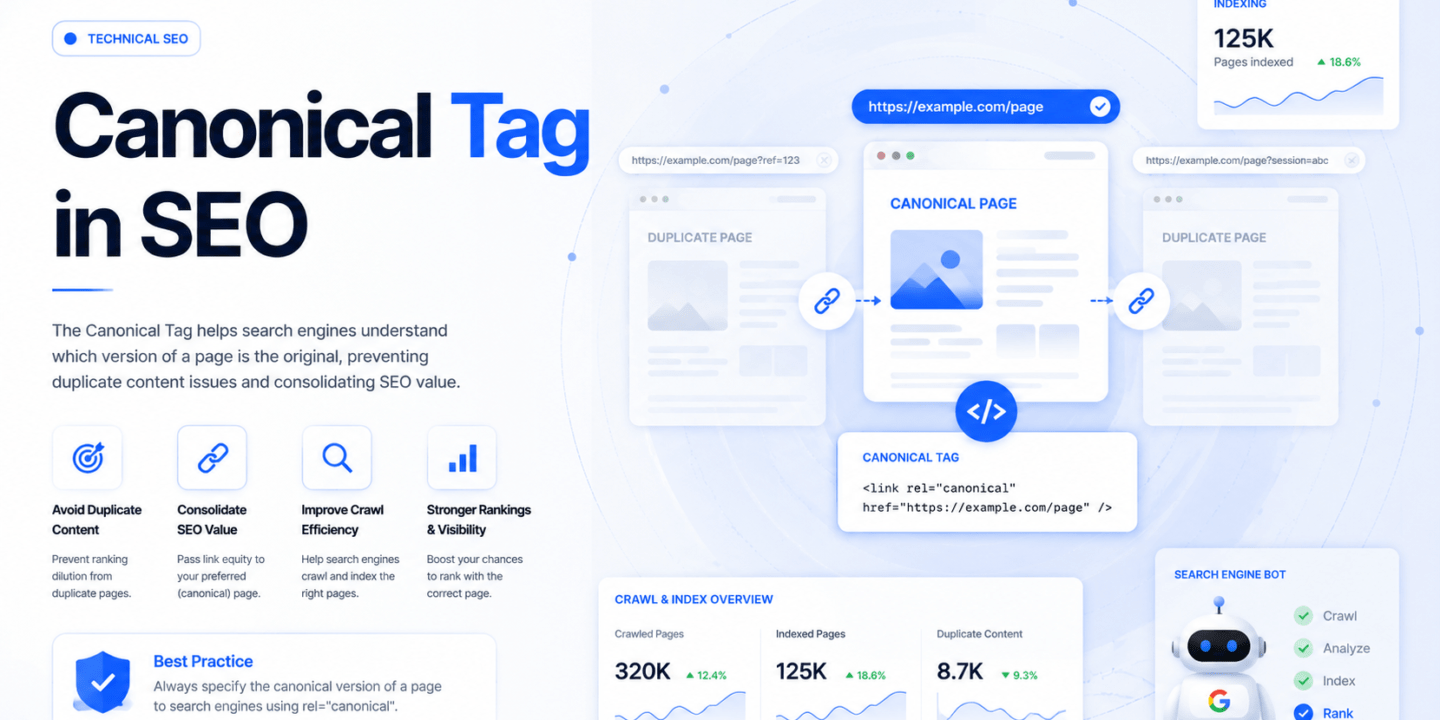
A canonical tag is one of the most important technical SEO elements that helps search engines understand which version of a page should be treated as the original.
Without it, even good content can struggle to perform properly in search results.
What Is a Canonical Tag?
A canonical tag is an HTML element that tells search engines which URL is the “main” or preferred version of a page.
It is usually added in the head section of a webpage and looks something like this:
<link rel="canonical" href="https://example.com/main-page/" />
This tag signals to search engines like Google that even if there are multiple similar pages, they should treat the specified URL as the primary one.
Understanding Canonical Tags with a Simple Example
Imagine you have an eCommerce website where the same product can be accessed through different URLs, such as:
- example.com/shoes
- example.com/shoes?color=black
- example.com/shoes?ref=homepage
Even though the content is nearly identical, search engines may treat these as separate pages.
By adding a canonical tag pointing to the main URL (example.com/shoes), you’re telling search engines which version should be indexed and ranked.
Why Canonical Tags Are Important for SEO
Canonical tags help solve one of the most common SEO problems — duplicate content.
When multiple pages compete against each other, search engines may not know which one to rank, and your authority gets divided. A canonical tag consolidates that authority into one preferred page.
It also helps preserve link equity, meaning if different versions of a page receive backlinks, their value is combined instead of being split.
Additionally, canonical tags improve crawl efficiency by guiding search engines toward the most important version of your content.
How Canonical Tags Work
When a search engine crawls your page and finds a canonical tag, it uses that as a signal to decide which URL should be indexed.
However, it’s important to understand that canonical tags are hints, not commands. Search engines usually respect them, but they may choose a different URL if signals conflict.
That’s why consistency across your website is critical when using canonical tags.
Common Situations Where Canonical Tags Are Used
Canonical tags are especially useful when your website has multiple URLs with similar content.
This often happens in eCommerce sites with product variations, blogs with pagination, or websites that use tracking parameters in URLs.
They are also used when content is republished across multiple platforms or when HTTP and HTTPS versions of a page exist.
Best Practices for Using Canonical Tags
To use canonical tags effectively, you should always point them to the most relevant and complete version of a page.
Each page should ideally have a self-referencing canonical tag to avoid confusion. It’s also important to ensure that the canonical URL is accessible and not blocked by robots.txt or noindex tags.
Avoid pointing multiple unrelated pages to the same canonical URL, as this can send misleading signals to search engines.
Common Mistakes to Avoid
One of the biggest mistakes is using canonical tags incorrectly, such as pointing all pages to the homepage. This can harm your rankings instead of helping.
Another common issue is inconsistency, where internal links, sitemaps, and canonical tags all point to different URLs.
Ignoring canonical tags completely can also lead to duplicate content issues that silently affect your SEO performance.
Canonical Tags in 2026 SEO
In today’s SEO landscape, canonical tags are even more important because websites are more complex than ever.
With AI-generated content, dynamic URLs, and multi-platform publishing, managing duplicate content has become critical.
Search engines are smarter, but they still rely on clear signals. Canonical tags help ensure your content authority is focused where it matters most.
Conclusion
A canonical tag might look like a small piece of code, but it plays a huge role in maintaining your website’s SEO health.
It helps search engines understand your content structure, prevents duplicate content issues, and ensures your ranking power is not divided.
If you’re serious about scaling your website and improving rankings, implementing canonical tags correctly is not optional — it’s essential.
FAQs About Canonical Tags
What is a canonical tag in SEO?
A canonical tag is an HTML element that tells search engines which version of a webpage should be treated as the main or original version.
Why is a canonical tag important?
It helps prevent duplicate content issues and ensures that ranking signals are consolidated into a single URL.
Where do you add a canonical tag?
A canonical tag is added in the head section of a webpage’s HTML code.
Can canonical tags affect rankings?
Yes, they help improve rankings by consolidating link equity and avoiding duplicate content confusion.
Is a canonical tag the same as a redirect?
No, a canonical tag is a suggestion to search engines, while a redirect physically sends users to a different URL.
Should every page have a canonical tag?
Yes, it is recommended to have a self-referencing canonical tag on every page.
What happens if you don’t use canonical tags?
Search engines may index duplicate pages, which can dilute your rankings and reduce SEO performance.
Can you have multiple canonical tags on one page?
No, having multiple canonical tags can confuse search engines and should be avoided.
Do canonical tags pass link equity?
Yes, they help consolidate link equity from duplicate pages into the main URL.
When should you not use canonical tags?
You should not use canonical tags when pages have completely different content or intent.

No Comments